
Updated: October 9, 2026
Disclosure: GearSift is reader-supported. Some links on GearSift may be affiliate links that earn us a commission at no extra cost to you. This article currently contains none. Learn more.
“8K polling” is now on mice that cost far less than flagship models. Here’s what it means, what it costs you in battery and CPU load, and a few 8K mice worth knowing about.
How we chose: research-based. We used manufacturer pages and support documents (cited below, checked October 9, 2026, ET). We have not physically tested these mice. Battery and latency figures are the makers’ own claims.
The short answer
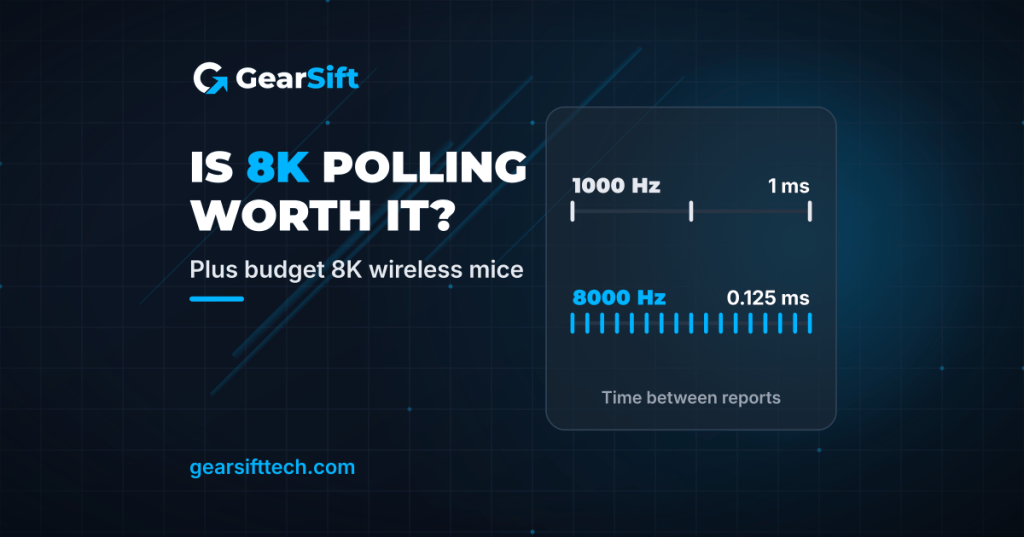
- What 8K means: the mouse reports to your PC up to 8,000 times a second instead of 1,000. Razer describes it as cutting input delay from 1 ms to 0.125 ms [1]; Logitech lists 8000 Hz as “0.125ms” [2].
- What it costs: battery life and PC headroom. One budget mouse in this guide is rated for up to 750 hours at 1000 Hz but up to 120 hours at 8000 Hz [4]. Razer warns your PC “may not be powerful enough to support Razer HyperPolling” [1].
- Our take (opinion): 8K is most relevant if you play fast competitive games on a high-refresh monitor and your PC has CPU headroom. Otherwise, we think 1000–2000 Hz is enough for most players, and battery life is much longer at those rates on the one mouse that publishes per-rate figures [4]. Razer itself suggests dropping to 4000 or 2000 Hz if you see stutter [1].
What polling rate actually changes
Polling rate is how often a device sends data to the PC [1]. More reports per second means more up-to-date cursor positions. Razer says the benefit shows up “when combined with a high refresh-rate monitor” [1].
| Polling rate | Time between reports |
|---|---|
| 1000 Hz | 1 ms (calculated: 1 ÷ 1000 s) |
| 8000 Hz | 0.125 ms [2] |
Razer’s page shows average-latency charts in which its 8000 Hz wireless mice come out ahead of other wireless 8000 Hz mice [1]. Those are Razer’s own published figures, not independent results.
The trade-offs
Battery. Rapoo publishes battery life by polling rate for the VT7 Series Gen-2 [4]:
| Polling rate | Rapoo’s claimed battery life |
|---|---|
| 1000 Hz | Up to 750 hours |
| 2000 Hz | Up to 550 hours |
| 4000 Hz | Up to 150 hours |
| 8000 Hz | Up to 120 hours |
That’s one mouse, but it shows the pattern: at 8000 Hz you charge far more often.
CPU and games. Razer’s HyperPolling guidance says [1]:
- for CPU-bound PCs, the computer “might lack the resources needed to process 8,000 reports a second”;
- some game engines, “particularly in older titles”, can’t handle high polling rate devices well;
- close non-essential apps, keep firmware current, and use Windows 11 (Razer cites update KB5027303 for high report rate devices).
Wireless setup. Razer recommends keeping the 8K dongle within 30 cm and in line of sight of the mouse, away from active USB 3 hubs, which it says can add 2.4 GHz noise [1].
Budget 8K wireless mice
Rapoo VT7 Series Gen-2
- 8000 Hz polling, wired and wireless [4].
- Two versions: Standard (PixArt PAW3398, 26,000 DPI) and MAX (PixArt PAW3950, 30,000 DPI native, up to 45,000 in Rapoo’s driver) [4].
- 53 g; Rapoo notes this excludes the receiver and has a ±3 g tolerance [4]. 800 mAh battery with the per-rate figures above [4].
- USB-C wired or Rapoo V+ 2.4 GHz wireless; A HUB driver for Windows and Mac, plus a web driver [4].
- Note on Rapoo’s page: the title says “Symmetrical” and the features say “Ambidextrous Design”, but the spec table lists “Shape: Ergonomic” and “Hand Compatibility: Right” [4]. Check the shape photos before buying if you’re left-handed.
See the Rapoo VT7 Series Gen-2 on Rapoo
Rapoo VT3 Gen-2
- “True 8000hz Polling Rate” in both wired and wireless modes; spec table: “Up to 8000Hz” [5].
- PixArt PAW3398 sensor, 50–26,000 DPI; Nordic 54L15 MCU [5].
- 53 g; Rapoo notes this excludes the receiver and has a ±3 g tolerance [5]. 126 × 68 × 42 mm [5].
- Ergonomic shape that Rapoo says fits palm and claw grips [5].
- USB-C wired or 2.4 GHz wireless (USB adapter in the box); A HUB driver for Windows and Mac [5].
- 10 programmable buttons [5].
- Trade-off: Rapoo lists an 800 mAh battery “up to 750hrs” but doesn’t say at which polling rate [5].
- Both budget picks are from Rapoo. The VXE MAD R was listed as sold out on VXE’s own store when we checked on October 9, 2026 [7].
See the Rapoo VT3 Gen-2 on Rapoo
Premium 8K mice, for contrast
Razer Viper V4 Pro
- Razer says its HyperSpeed Wireless Gen-2 system enables “true 8000 Hz polling” [6].
- 49 g (50 g for the White Edition); Focus Pro 50K Optical Sensor Gen-3 [6].
- “Up to 180 hours” of battery; the page doesn’t say at which polling rate [6].
- Smart Polling Rate Switcher in Razer Synapse can change the polling rate per game [6].
- Trade-off: right-handed symmetrical shape aimed at claw and fingertip grips, per Razer [6].
See the Razer Viper V4 Pro on Razer
Logitech G PRO X Superlight 2
- LIGHTSPEED wireless “with up to 8 kHz polling”; max report rate 8000 Hz (0.125 ms) [2][3].
- 60 g; HERO 2 sensor [2].
- Battery: “Constant Motion: 95 Hrs”; the spec page doesn’t say at which polling rate [2].
- Trade-off: the heaviest mouse here [2][4][5][6]. Advanced features need Logitech G HUB [2].
See the Logitech G PRO X Superlight 2 on Logitech G
Side-by-side
| Rapoo VT7 Series Gen-2 | Rapoo VT3 Gen-2 | Razer Viper V4 Pro | Logitech PRO X Superlight 2 | |
|---|---|---|---|---|
| Max polling | 8000 Hz wired + wireless [4] | 8000 Hz wired + wireless [5] | 8000 Hz wireless [6] | 8000 Hz wireless [2][3] |
| Weight | 53 g ±3 g [4] | 53 g ±3 g [5] | 49 g (White 50 g) [6] | 60 g [2] |
| Battery claim | Up to 120 h at 8000 Hz; 750 h at 1000 Hz [4] | Up to 750 h; polling rate not stated by Rapoo [5] | Up to 180 h; polling rate not stated by Razer [6] | 95 h constant motion; polling rate not stated by Logitech [2] |
| Price tier | Budget | Budget | Premium | Premium |
Specs from the maker pages numbered in Sources, checked October 9, 2026 (ET).
Price tiers are relative to the products in this article. Each tier is based on the maker’s own US store listing, checked October 9, 2026 (ET). We don’t list street or retail prices because they change. “Not assigned” means we couldn’t find a price on the maker’s own US site. Check the current price before you buy.
FAQ
Will 8K polling make me a better player?
We can’t promise that. Razer says many pro players noticed a smoother, more responsive experience in blind tests [1], but that’s Razer’s claim. Your monitor, game and PC all matter.
Can I run 8K and save battery?
The mice here aren’t locked to 8K: Rapoo lists “Up to 8000Hz” for the VT3 Gen-2 [5] and publishes battery figures from 1000 to 8000 Hz [4], and Razer’s Synapse can switch the rate per game [6]. A practical approach (our suggestion): use 1000–2000 Hz day to day and 8K only for competitive games.
What about controllers?
The four controllers in our Hall effect vs TMR research top out at 1000 Hz on PC. (Planned: Hall effect vs TMR sticks, anti-drift controllers for PC.) Setting up your desk too? (Planned: Best monitor arms for ultrawide monitors.)
Real gear for a better everyday.
Sources (all checked October 9, 2026, ET)
- Razer, HyperPolling Wireless Gaming Technology (incl. Best Practices & Tips): https://www.razer.com/technology/razer-hyperpolling
- Logitech Support, Specification – G PRO X Superlight 2 Lightspeed Gaming Mouse: https://support.logi.com/hc/en-us/articles/15235304069783-Specification-G-PRO-X-Superlight-2-Lightspeed-Gaming-Mouse
- Logitech G, PRO X Superlight 2 product page: https://www.logitechg.com/en-us/shop/p/pro-x2-superlight-wireless-mouse
- Rapoo, VT7 Series Gen-2 8K Wireless Gaming Mouse (specs and battery table): https://shop.rapoo.com/products/rapoo-vt7-series-gen-2-wireless-gaming-mouse-ultra-lightweight
- Rapoo, VT3 Gen-2 8K Ergonomic Wireless Gaming Mouse (specs table): https://shop.rapoo.com/products/rapoo-vt3-gen-2-wireless-gaming-mouse
- Razer, Viper V4 Pro product page: https://www.razer.com/gaming-mice/razer-viper-v4-pro
- VXE (ATK), MAD R Series Wireless Mouse store listing (availability only): https://vxe.com/products/vxe-mad-r-series-wireless-mouse


Leave a Reply